Unfortunately, the OS was reinstalled before I could ask for a kernel-dump to have fun/learn with for later purposes, but it's okay, we have enough information. The thread can be found (here)
--------------------
So here's the bug check itself:
SYSTEM_SERVICE_EXCEPTION (3b)
This indicates that an exception happened while executing a routine that transitions from non-privileged code to privileged code.
We've all seen this before, fairly common bug check. Let's look further into the dump:
BugCheck 3B, {c0000005, fffff80003cef274, fffff8800cd1ef50, 0}
0: kd> ln fffff80003cef274
(fffff800`03cef230) nt!IofCallDriver+0x44 | (fffff800`03cef290) nt!ExQueryDepthSList
^^ From the above, we can see that the exception occurred in nt!IofCallDriver. We can also see mention of nt!ExQueryDepthSList, which is a routine that returns the number of entries currently in a given sequenced singly linked list.
Linked list + an exception occurring in nt!IofCallDriver. Well, what driver? This is very suspicious. At this point, I was very concerned a rootkit was present on the system. Why did I become suspicious of a rootkit being present? Well, first we must understand how rootkits work. I am not going to go extremely in-depth, but I will of course explain!
--------------------
In its most basic description, rootkits (at least in this generation) thrive off of what is known as Direct Kernel Object Manipulation (DKOM). DKOM greatly increases the sophistication of the rootkit and allows it to go undetected by today's basic antivirus suites. Some of the things it allows rootkits to do are:
1. Hook the Interrupt Descriptor Table (IDT). By doing this, the rootkit can filter exported kernel functions. Remember, interrupts signal the kernel that something needs to be done. That's exactly how today's OS' work, they work based on interrupts.
-- It's worth noting that current generation (as of this post, at least) rootkits actually do no longer hook, as it's detectable. However, as far as I know, the IDT is still hooked.
2. Direct access to kernel memory.
3. Modify objects in memory and go undetected in doing so.
4. Hide processes, files, network-based connections (ports), etc.
5. Add privileges/groups to tokens. It can also go one step further and manipulate the token to fool Event Viewer.
etc...
--------------------
With this said, let's take a look at how processes are overall managed by the OS:
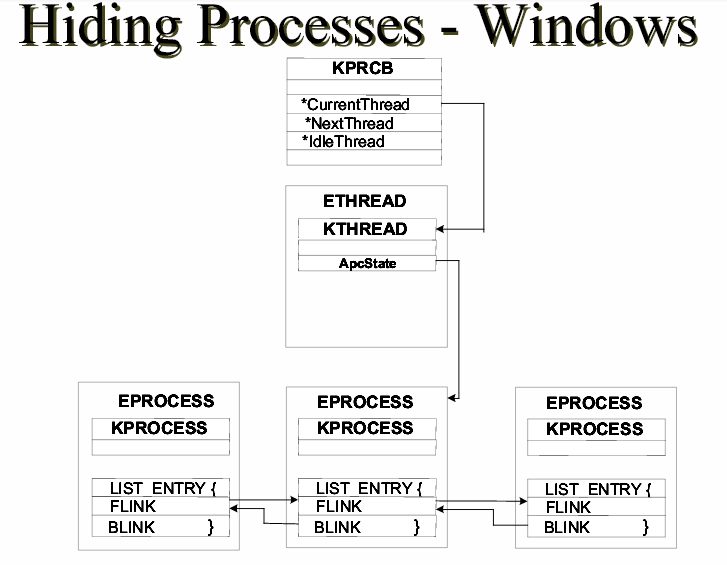
(thanks to the HB Gary .pdf for this)
I am not going to go in-depth here, but if you'd like to understand a fair amount about this diagram, my good friend Harry has written about it (here).
Essentially, rootkits take advantage of the linked list structure by modifying pointers within the linked list by using DKOM. Rootkits also change the Flink and Blink pointers (which we can see in the above diagram) to wrap around processes that should be hidden.
--------------------
So now that we understand all of that, you should now also understand why I was suspicious when seeing a linked list routine + an exception occurring in nt!IofCallDriver.
When I saw this, I had the user run aswMBR. This is a rootkit scanner that scans for TDL4/3, MBRoot (Sinowal), Whistler and other rootkits. Here was the log:
aswMBR version 0.9.9.1771 Copyright(c) 2011 AVAST SoftwareFrom the above log, we can see it's showing a hidden service (driver appears to be likely loading at boot). The 3d0ce9e8976dc0a9.sys driver is the driver responsible for this call - nt!IofCallDriver.
Run date: 2014-03-28 10:16:54
-----------------------------
10:16:54.620 OS Version: Windows x64 6.1.7601 Service Pack 1
10:16:54.620 Number of processors: 2 586 0x170A
10:16:54.622 ComputerName: **Removed** UserName:
10:16:58.691 Initialze error C0000001 - driver not loaded
10:17:34.248 Service scanning
10:17:35.346 Service 3d0ce9e8976dc0a9 C:\Windows\System32\Drivers\3d0ce9e8976dc0a9.sys **HIDDEN**
10:18:19.964 Modules scanning
10:18:19.972 Disk 0 trace - called modules:
10:18:19.977
10:18:19.982 Scan finished successfully
10:18:59.144 The log file has been saved successfully to "C:\Users\**Removed**\Desktop\aswMBR.txt"
The user also noted that when attempting to install HijackThis, they got the following message:
The system administrator has set policies to prevent this installation.Remember step #5 from above?
5. Add privileges/groups to tokens. It can also go one step further and manipulate the token to fool Event Viewer.This is exactly what the rootkit did, it appeared to modify tokens and disallow the install of Hijackthis, and other probable common startup/hijacker detection software.
--------------------
Overall, the user reinstalled the OS.
Thanks for reading, more debugging posts soon!
