Showing posts with label tutorial. Show all posts

Saturday, July 26, 2014

Customizing the WinDbg environment

Hi everyone,

In this post, I am going to discuss some of the customizations that I have come across in reading and videos from those such as Andrew Richards, etc, that I always make to my WinDbg environment to make it that much more comfortable/easier in the long run. In this post, I am using a fresh install of Windows 7 x64 on a VM so I can explain better and truly start from scratch. Do note that all of the customizations I make here also follow on Windows 8, etc, as well.

Disclaimer: This post will not teach you/show you how to install WinDbg! There are already plenty of posts and tutorials out there regarding that. This is strictly regarding its customization once it is installed.

Registering File Associations

On clean install of WinDbg with zero modifications and/or customizations done, this is what crash dumps look like:


We can see that the kernel-dump in the picture has no icon, etc, and is just a file. This is due to the fact that it has no known association. If we attempt to double click the crash dump in this state, Windows throw an error and say "Hey, we have no idea what type of file this is, so can you please perhaps tell us what program you'd like to associate all future crash dumps with?"

To properly circumvent this and set the file association, we're going to want to open an elevated command prompt. You can quickly do this by pressing Windows Key + R to open the run box, and then typing cmd and pressing Ctrl+Shift+Enter to execute an elevated command prompt.

Now that we have a window open, let's sidetrack to discuss something. If you navigate to the location in which you installed your WinDbg, and go into the Debuggers folder, we see the following:


We have an x86 and x64 debugger, and this is due to the fact that it's always best to debug a crash dump in its original architectural environment. With this said, if you're debugging a crash dump generated by an x64 box, you'll want to use the x64 debugger. At least 90% of all crash dumps you'll be debugging at this time in our life will be x64, therefore we want to obviously associate the x64 debugger as the main program for crash dumps. It just makes sense.

Now that we have navigated to the Debuggers folder, we can register associations by quickly going one folder higher (x64) and typing the following:

windbg -IA

Typing the above will do the following:


-- YOU MAY NEED TO RESTART AFTERWARDS TO HAVE IT FULLY APPLY.

Great! Now all future crash dumps are associated with the x64 debugger. This raises one problem though, what if we're assisting a user and they are on an x86 box? Surely we can just navigate to the WinDbg directory, go to the x86 folder and open the debugger, but this is too much work.

With the above said, let's have some fun by pressing the Windows Key + R to open the run box, and then typing regedit to execute the Registry Editor. The key we're interested in working within is HKEY_CLASSES_ROOT. It's important to note that this is the key that controls all of the file name extension associations and COM class registration information. With that said, programs start how they're supposed to thanks to this key!

Now we want to take a peek at the extension .dmp (scroll down until you see it, or actually type .dmp until you get there):


The above is essentially a shortcut which implies in the default key, jump to WinDbg.DumpFile.1.

Now that we know this, let's go ahead and do as we did above, but instead type windbg until we get to WinDbg.DumpFile.1. You can alternatively scroll as well if you're cautious of screwing anything up, although it'll take you awhile:


WinDbg.DumpFile.1 is where the .dmp extension is housed.

If we click DefaultIcon:


The familiar little computer WinDbg icon is what resource -3002 is from windbg.exe.

If we go into shell, we see Open:


If we double-click the string itself:


&Open actually creates the underscore under the O in the Open command in the context menu for right-clicking a crash dump. We want to change this from &Open to Open x&64, for example:


and then click OK.

Now that we've done this, as said above, on the context menu for crash dumps, instead of saying Open, it will say Open x64. For example:


Great! We're making progress, but we also want an Open x86 option on the context menu as well. In order to do this, bring regedit back up and right-click shell, select new, and then select key. Once you've done this, name the new key Open_x86. After we've done all that, this is what regedit should look like:


With all of the above done, now we need to go ahead and set that value by double-clicking where it says (Default), and typing Open x&86 this time as opposed to Open x&64 as we did earlier above. Now we need to right-click our Open_x86 key, select new, and then select key. Once you've done this, name the new key command. After we've done all that, this is what regedit should look like:


Once we have the above, to save ourselves some time, let's navigate to Open's command key, double-click (Default), and then copy the string's Value data. For example:


With the above Value data copied, let's navigate back to our created Open_x86's command key, double-click (Default), and then paste into Value data's empty box. DO NOT PRESS OK YET!

We need to make an adjustment to the path, which is extremely simple.

Here was my pasted Value data:

"C:\Program Files (x86)\Windows Kits\8.1\Debuggers\x64\windbg.exe" -z "%1"

Here is what it needed to be changed to:

"C:\Program Files (x86)\Windows Kits\8.1\Debuggers\x86\windbg.exe" -z "%1"

Extremely simple as I noted, and all I had to do was change x64 to x86.

With all of the above said and done, now if we once again right-click a crash dump to bring up its context menu, here's what we now see:


Fantastic, so now we no longer need to spend time traversing through folders and such to open the x86 debugger if we need to. You may be saying to yourself "This was a bit of a pain, I really don't want to do this every time I have to reinstall Windows...". You're in luck, you don't have to!

If you now right-click WinDbg.DumpFile.1 in regedit, select Export, and save it as WinDbg_IA.reg, you're now exporting that registry key from the registry to be saved. This is extremely handy because you can throw it on your trusty USB that you use for absolutely everything debugging related, and when you're on a brand new system/different system that doesn't have file associations set that you need to debug, you can just quickly install the key, and you're good to go. This also of course saves you from having to do this process on your own system.

-- Do note that you will have to do the windbg -IA command before installing the registry key or it will not work. Once you've done the windbg -IA command, you can then simply install the registry key and all the work is done.

Symbols

So now that we have file associations registered for crash dumps, and have successfully modified our crash dump context menu to contain an option to either execute the x64 or x86 debugger, let's go one step further and automate the creation, download, etc, of symbols.

One thing to note is that everything we're doing here in this post could be done manually, but will take twice the actual effort, and will in the end waste time. When we're debugging, etc, and looking to get a box back up and running that we're debugging on, time is of the essence. With that said, all of these steps are to make our lives as debuggers much easier.

First off, it's important to understand what symbols are! Symbols (also known as PDB files -- program database) hold a variety of data which are not actually needed when running the binaries, but contain very useful debugging information. The fact that they are not needed when running the binaries themselves is the reason why PDB files exist! PDB files exist to separate the symbols from the binary, which ultimately helps limit the size of the executable, saving disk storage space and reducing the time it takes to load the data.

Symbol files contain:
  • Global varibles
  • Local Variables
  • Function names and the addresses of their entry points
  • Frame pointer omission (FPO) records
  • Source-line numbers
Each of these items is individually a symbol. For example, a single symbol file called Myprogram.pdb might contain several hundred symbols, including global variables and function names and hundreds of local variables.

Unfortunately, as debuggers who aren't internally within a company (Microsoft for example), we are only provided with what is known as public symbols (as opposed to private). The differences are listed here.

With all of the above said, if a debugger attempts to load a crash dump without symbols, we won't be able to successfully resolve functions, etc, and it'll instead be junk. This is why symbols are very important to have. Normally, when you first install WinDbg, you'd have to navigate to File>Symbol File Path and manually set the path. However, since time is of the essence and we love to do things automatically, we're going to make a one-time script that will set everything for us.

Let's get to work!

1. Create a next .txt file on your Desktop.

2. Within the new .txt file, paste the following code:
md c:\Symbols
md c:\Symbols\Src
md c:\Symbols\Sym
md c:\Symbols\SymCache
setx /M _NT_SOURCE_PATH SRV*C:\Symbols\Src
setx /M _NT_SYMBOL_PATH SRV*C:\Symbols\Sym*http://msdl.microsoft.com/download/symbols
setx /M _NT_SYMCACHE_PATH C:\Symbols\SymCache
You can change Symbols to whatever you want. I just find naming it Symbols is easy to remember and obvious on what's being stored there.

So, what is this script doing?

- Creating the Symbols directory in C:\.

- Inside of the Symbols directory, it's also creating three subfolders: Src, Sym, SymCache.

Src - Source code.

Sym - Symbol path.

SymCache - Symbol cache.

This ultimately creates an environment variable which sets it all for us, therefore we have to do nothing manually.

To expand a little, the reason we're using * in the script is to essentially say:

"Hey, look at C:\Symbols for the symbols. Are they there?"

If the answer is yes, then the symbols are loaded locally.

If the answer is no, then here's what it instead says:

"Hey, look at C:\Symbols for the symbols. Are they there? Oh wow, they're not?! Okay, let's grab them from http://msdl.microsoft.com/download/symbols instead!"

This is done that in the event your local symbols aren't available for some reason, it'll download them from the MSFT symbol server.

3. After pasting the code and changing anything about it to your liking (such as the directory name itself), navigate to File>Save As, change the Save as type: to All Files, and finally give it the File name: Symbols.bat or Symbols.cmd, etc.

4. Once you've done that, run it.

5. After it runs, you're all done setting up symbols and never have to worry about them ever again.

Extensions

Extensions are a really brilliant part of WinDbg that I actually didn't use for awhile, but once I looked into them more, it really has made my life a lot easier. First off, one of the extensions I really can't live without now even using it for such a short period of time is SwishDbgExt.

Some of its features, etc, are listed on that page, as well as the download link. Once you've downloaded it, installing it is really easy. When you extract it, it has a few items, but only two folders you're interested in (x64 and x86). Inside both of these folders is the extension itself, but for its specific architecture.

Now that you know the existence of the extension files, do the following:

1. Navigate to your WinDbg directory. For example, mine is C:\Program Files (x86)\Windows Kits\8.1\Debuggers

2. Once inside the Debuggers folder, double-click the x64 folder, and then the winext folder.

3. Now that you're in the winext folder, this is where you will simply drag n' drop the extension itself from the x64 extension folder. Once you've done that, you're all done for x64. Do the same for x86.

4. Now that you have both the extension files in their respectable directories, load up a crash dump as an example and type !load swishdbgext to load the extension. For example:


Once it's loaded, you can then use any of the various commands that this extension holds. For example, we could run !ms_drivers to display a list of drivers loaded:


We can get in-depth IRP information this way on a driver, such as myfault.sys:


Workspace


Here's what you can get your workspace to look like with some time and some messing around. This was done based off of Tess Ferrandez's workspace. I personally prefer the all stock white/black WinDbg, but if The Matrix is your thing, go for it.

You can make all of these edits by opening up WinDbg on its own and not with a dump file, navigating to View>Options, and changing the Colors how you want. You can also change Fonts through the View menu. Ensure that after you get yours all set, you manually save your workspace by going to File>Save Workspace As..., and then creating one. This will save your workspace and make it the default for the future.

That's it for now, thanks for reading!

References/LinksPimp up your debugger: Creating a custom workspace for windbg debugging.
Channel9.

Wednesday, July 16, 2014

Page Faults Explained

Hello everyone!

In this post, I'm going to do my best to go in-depth regarding page faults, but do my best to speak English at the same time. There are many page fault related articles out there, but I've noticed they're either picking up from an imaginary somewhere (i.e a rushed explanation that seems to begin and end abruptly), incomplete, assume you're already knowledgeable (even basic) regarding Windows' memory manager, paging, page faults, etc. Recently, thanks very much to Pavel Yosifovich, I have a better understanding of page faults and would like to as always share my knowledge as a whole.

-- I would like to note that in the making of this post, as far as double-checking to ensure I was correct goes, if I was not flat out correct, I was either incorrect or learned way more than I thought I knew. This is one of the things I love most about making blog posts, and learning in general.

--------------------

First off, before even diving into page faults themselves, and especially since we want to do this the right way, we need to understand a few things (well, many things).

Disclaimer: I am not going to go extremely in-depth regarding Windows' memory manager (as that would take forever and a half/my knowledge is solely my knowledge), and if you are interested in that, Mark Russinovich has done a brilliant article over at TechNet, as well as many others all across the web if you do some digging (or check the reference links below). I am merely laying the groundwork for the understanding and explanation of page faults and nothing more.

If you ask me personally, Windows' memory manager (and memory management in general throughout the operating system) is one of the most complicated and in-depth parts of Windows internals. It's daunting yet extremely fascinating at the same time, as one extremely in-depth piece leads to another. It seems endless, and I highly recommend spending time reading into the memory management specifics throughout Windows, as it's truly fascinating.

Physical Memory

Physical memory is by far one of the most important resources, and one we must absolutely understand. Among many things, the memory manager within Windows is responsible for the data of all current active processes, drivers, and the operating system. Even today as of this blog post, the operating system itself accesses more code/data than can actually fit in physical memory. With this said, as said by the brilliant Mark Russinovich, think of physical memory as a window into the code/data used over time.

Now that this is known, we can understand that the amount of physical memory present on the system affects performance greatly, because if the data/code needed for a process or the operating system itself is not directly available in physical memory, it must be brought in (paged-in) from the disk which is quite the performance hit.

One of the reasons it's very important to understand physical memory before virtual memory (or in general) is because physical memory contributes to the virtual memory system limit, which interestingly enough is roughly the size of physical memory plus any page files configured on the operating system.

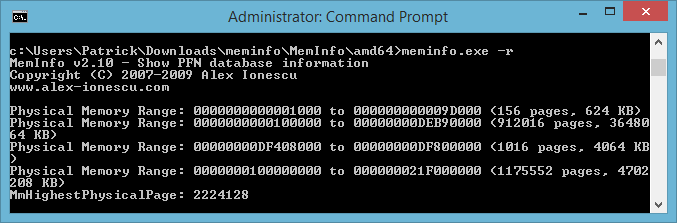
We can view the layout of physical memory with Meminfo (download here). Do note that you'll need to execute the program through an elevated command prompt manually. You can see the path I chose in the screenshot below, as well as the layout itself.


If you use meminfo.exe it will display the different parameters you can use. In our case, if we use meminfo.exe -r it will run Meminfo and display the valid physical memory ranges that are detected.

If you're interested in going further regarding physical memory consumption device-wise, you can use Device Manager to check what addresses devices are occupying. The image below is a simple snippet of my personal system's memory consumption as an example.


We can also take a look at the physical memory limits of Windows 7 and 8 as an example.


As we can see, the actual physical memory limits themselves on the client operating systems drastically increase regarding its x64 architecture, yet remain the same with x86. x86's physical limit has remained 4 GB since Windows XP as far as its client operating systems go. This is simply due to the fact that on x86 systems, the processor's address bus which is 32 lines (and/or 32 bits) can only access addresses ranges 0x00000000 to 0xFFFFFFFF (totaling 4 GB).

--------------------

Virtual Memory

Now that we understand some of the fundamentals behind physical memory, we can go ahead and discuss virtual memory. Do you have your cup of coffee? Good, you're going to need it. It's very important to first understand that virtual memory is a completely different entity than physical memory, although they both work together hand-in-hand.

An extremely important thing to note at this point is a process does not equal (=/=) and/or mean the same thing as a program, and the same follows regarding a thread. For example, when and if you hear a user say "My Firefox (32 bit) process is running according to Task Manger", that's actually not correct. Processes do not run, threads run. Processes are solely a set of resources used to execute a program, and consist of a private virtual address space (where memory is allocated), an executable used to start the application (.exe), a table of handles to various kernel objects, a security context (otherwise known as access token), and one (or possibly more) threads that execute the code.

With all of the above said, virtual memory (of many things, at least) is a technique of Windows' memory manager that maps memory addresses used by a program, namely virtual addresses, into physical addresses. In layman's terms, virtual memory exists to separate a program's view of physical memory, so the operating system can then go ahead and decide whether to store that program's code/data physically and/or virtually.

Let's break this down further! When you run a program, it will go ahead and generate addresses which are generated in the following ways:

  • Load instruction
  • Store instruction
  • Fetching an instruction

Absolutely phenomenal article here regarding the first two. In short, the first two create data addresses, and the third goes ahead and creates instruction addresses. It's very important to know that RAM cannot distinguish between the two, and simply sees them as addresses. Addresses generated by programs are considered virtual, therefore it needs to be translated to a physical address. How does this happen? Good question! This all occurs through address translation hardware (done by the CPU and invoked by the kernel), known as MMU.

After MMU translates virtual > physical, the operating system can then go ahead and create a virtual address space that allows programs to reference more memory than actually physically available by using disk. This is one of the main benefits regarding virtual memory, aside from memory protection.


Thanks to Mike from BrokenThorn for the above image!

All of the above now finally leads into paging and page faults, which will be discussed below.

--------------------

Paging

Paging is very important in many ways, mainly because it allows the operating system to virtualize memory without worrying about segmentation. Instead of splitting up an address space into three logical segments, it's split up into fixed-size units known as a page.

-- A page is a sequence of N bytes where N is a power of 2.

Page sizes are at least 4 K and at most 64 K or more.

--------------------

Page Table/Disk Map

Now that we understand pages/paging, every address space on the system has two things associated with it:

1. Page Table - Identifies which/what pages are in physical memory.

2. Disk Map - Identifies where all the pages are on the disk.

Both of these describe an entire address space.

In an effort to make my own content this time as opposed to using pre-created images (inspired by P.J. Denning and Steve Coile), I have created the image below.


Regarding the above image, the followings flags are:

P - Presence flag

U - Used flag

M - Modified flag

F - Page frame

A - Disk address

With the above now known, if the P flag is set, this implies that the page is currently in physical memory (RAM). The F flag determines its location in memory, and is the number of the page frame in which the page is located.

If however the P flag is not set (not in physical memory), the address mapper will throw a page fault if the process in question attempts to reference the page. If this occurs, the page fault handler will use the disk map to go ahead and locate the page on the disk, and finally swap it (or page it) in. This is only a very minor explanation of a page fault process, and I will expand on page faults below.

--------------------

Page Fault

Finally! We get to the page fault, what we've been waiting for. I described above a very basic page fault process, but it's a lot cooler/interesting than that! In its basic definition of course, a page fault occurs when a program attempts to access pages that are not currently in physical memory (RAM). This is also known as a hard fault. It's absolutely imperative you understand the difference between hard fault and soft fault, which I will discuss below.

Hard Fault - Hard Fault (otherwise known/referred to as a major fault) is the exact same thing as Page Fault, and you'll see its name in Resource Monitor on newer versions of Windows (afaik Vista and later). To expand on why hard faults are defined as they are, and to stress on why they're expensive, it's due to the process the page fault handler must follow if one occurs. For example, if the page is not loaded into memory at the time of a program referencing its address, the page fault handler needs to find a 'free location'. This free location is either a page in memory, or a non-free page in memory.
 
If the latter is currently in use by a pre-existing process, the operating system needs to spend time writing out the data in that current page, and mark it as not being loaded into memory. Once this is done, it is now a free location and can be used to read the data for the new page into memory, add an entry to its location within the MMU, and finally of course indicate that it is now successfully loaded into memory.

Below is an image representation of the entire process outlined above.


Soft Fault - Entirely different from a hard fault, a soft fault is when the MMU (as we discussed above) has not yet marked a page being loaded in memory. This is sometimes/also referred to as a minor fault, as the solution is simple (i.e make the operating system create an entry for the page, have the MMU point to that page in memory, and finally of course indicate that it is now successfully loaded into memory).

With all of this said, you can imagine why page faults/hard faults are an extremely expensive process. It's also imperative that you also understand that having to unnecessarily access the disk is very slow. If anyone has ever had a system in which it was experiencing multiple/frequent page faults for whatever reason, they can truly attest to how much their system slows to a crawl.

Why is this? Well, since you now understand what actually occurs during a page fault behind the scenes, we can imagine how ridiculously taxing this is on the disk. It doesn't help that the process of actually accessing the disk itself is slow in general, but to have to constantly do it is very bad. This is a good time to discuss the main pros & cons of virtual memory (i.e the disk). It's more like pro & con, really.

Pros - Very easy to get a lot of disk space for a small cost.

Cons - Slow!

A processor's register can be accessed in about a nanosecond, cache in 5 nanoseconds, and RAM in approximately 100 nanoseconds. With this said, the disk is literally seconds slower (at least a million times slower). If you are constantly/frequently having to go through the process of a page fault, you can truly imagine yourself now how slow it is.

--------------------

Page Fault - Continued

To go a bit more behind the scenes in regards to page faults, what actually happens when a page fault occurs is the thread that was running is placed into a wait state until the operating system's page fault handler can go ahead and go through the page fault process outlined above. This is done through an interrupt that halts (remember, wait state) the current program.
 
The instruction that went ahead and attempted to either access the page that was invalid, or nonresident (i.e not in physical memory), fails and throws an exception that generates the interrupt discussed above. Before discussing anything any further, we must first discuss why an exception is thrown. Quite simply, an exception is thrown because the CPU has no idea what page files are, etc, and only knows how to work with memory.
 
At this point, one of two things happens:
 
1. An Interrupt Service Routine (ISR) determines that the address is in fact valid, however is not resident (not in physical memory). The operating system then goes ahead and throws an exception (page fault) and goes through the page fault process outlined above. Once the page fault process is successfully completed, the program picks up right where it left off like nothing happened.
 
or
 
2.  An Interrupt Service Routine (ISR) determines that the address is in fact invalid, and then throws an exception known as an access violation. Remember above how we discussed hard (major)/soft (minor) faults? This is specifically known as an invalid fault. In this case, as opposed to following the page fault process outlined above, it is told to not attempt to access the memory as it's a null/bad address, and to simply terminate the executing program in question.

With the above said, this may dispel the common misconception of saying 'frequent page faults are okay'. Frequent page faults are not okay, but that is not to say that page faults aren't a normal operation of the operating system. On a fully functioning machine (regarding both hardware and software), you will experience page faults on a very small scale due to some programs simply requiring more memory (an example). If you are experiencing a very large number of page faults occurring (hard faults/sec), you have a problem, and you can most certainly tell because your system is likely slowed to that of a snail.

As far as some of the potential issues go when it comes to frequent page faults on a system:
 
  • Insufficient RAM (physical memory).
  • Faulty RAM.
  • Need to tailor the pagefile to your system's specific needs.
  • etc

--------------------

Page Fault - BSOD

Now that we understand what happens when a page fault occurs in user-mode, it's also imperative we understand what happens when an exception such as an access violation is thrown in kernel-mode. As you may or may not be able to tell with the way I started this, when a page fault exception such as an access violation occurs in kernel-mode, this results in a bug check (Blue Screen of Death, BSOD).
 
Why? Well, remember we discussed that when an access violation for example occurs, the page fault handler goes ahead and terminates the program. What if we're in kernel-mode and the instruction involving the violation is a device driver? "Uh oh" is exactly what happens. Luckily I have a crash dump from just the other day!
 
SYSTEM_THREAD_EXCEPTION_NOT_HANDLED_M (1000007e)

This indicates that a system thread generated an exception which the error handler did not catch.

BugCheck 1000007E, {ffffffffc0000005, fffff88004a5d62a, fffff880035af908, fffff880035af160}

The 1st argument is the exception code that wasn't handled by the error handler. In this cause, ffffffffc0000005 is an NTSTATUS code. Kernel-mode drivers use NTSTATUS types for return values. ffffffffc0000005's NTSTATUS value is 0xc0000005 (otherwise known as an access violation).

Using NTSTATUS Values

The 2nd argument is the memory address in which the exception occurred at. In our case, this was fffff88004a5d62a.
 
The 3rd argument is actual exception record address. In our case, this was fffff880035af908 which we can run .exr on to show exception record information.
1: kd> .exr 0xfffff880035af908
ExceptionAddress: fffff88004a5d62a (igdkmd64+0x000000000003862a)
   ExceptionCode: c0000005 (Access violation)
  ExceptionFlags: 00000000
NumberParameters: 2
   Parameter[0]: 0000000000000000
   Parameter[1]: 0000000000073070
Attempt to read from address 0000000000073070
Just by looking at the attempted address read, we can assume it's not a null address (because it's not zero), so it must be simply invalid. You can if interested confirm this by running !pte address which will display the page table entry (PTE) and page directory entry (PDE) for the specified address. This is not a kernel-dump, so running it in my case wouldn't yield any beneficial results.

The 4th argument is the context record address. In our case, this was fffff880035af160 which we can run .cxr on to show the context record.
1: kd> .cxr 0xfffff880035af160
rax=0000000000073000 rbx=fffffa8006299040 rcx=fffffa800637d540
rdx=00000000008dfaf0 rsi=fffffa800637d540 rdi=fffff88004a5d3c0
rip=fffff88004a5d62a rsp=fffff880035afb40 rbp=fffffa8006356b20
 r8=0000000000000000  r9=0000000000000000 r10=0000000000000018
r11=fffff880035afb60 r12=fffffa8006356b20 r13=fffffa800661cc30
r14=0000000000000038 r15=fffff88000f15fe0
iopl=0         nv up ei pl nz na po nc
cs=0010  ss=0018  ds=002b  es=002b  fs=0053  gs=002b             efl=00210206
igdkmd64+0x3862a:
fffff880`04a5d62a ff5070          call    qword ptr [rax+70h] ds:002b:00000000`00073070=????????????????
This shows us the context that was saved from the exception at the time of the crash. It contains the CPU registers, the instruction we failed on, the bad address, etc. First off, as highlighted in blue, the exception (access violation) was thrown by/occurred because of igdkmd64.sys (Intel Graphics driver) referencing invalid memory. Regarding the instruction we failed on, we were calling a pointer in the rax register. The rax register in our case was 0000000000073000 (invalid). All of this invalid memory stuff occurring would result in a memory write to ????????????????, therefore the box bug checked.

We can see it from another perspective by disassembling the rip register:
1: kd> u @rip
igdkmd64+0x3862a:
fffff880`04a5d62a ff5070          call    qword ptr [rax+70h]
fffff880`04a5d62d 488b442420      mov     rax,qword ptr [rsp+20h]
fffff880`04a5d632 8b8034010000    mov     eax,dword ptr [rax+134h]
fffff880`04a5d638 c1e813          shr     eax,13h
fffff880`04a5d63b 83e001          and     eax,1
fffff880`04a5d63e 85c0            test    eax,eax
fffff880`04a5d640 0f84ab000000    je      igdkmd64+0x386f1 (fffff880`04a5d6f1)
fffff880`04a5d646 488b442478      mov     rax,qword ptr [rsp+78h]
--------------------

And that's that! I really hope you enjoyed reading, and I imagine there will be many edits/additions to be made as time goes by. For now though, at this moment, I am happy with it.

References/Links

- Pavel Yosifovich's Windows Internals 1/2.
- The Basics of Page Faults.
- Windows Memory Management (Written by: Pankaj Garg).
- Pushing the Limits of Windows: Physical/Virtual Memory.
- So What Is A Page Fault?
- HP OpenVMS Systems Documentation.
- Virtual Address Space and Physical Storage.
- Everything You Need To Know To Start Programming 64-Bit Windows Systems.
- Virtual Memory.
- Physical Memory Structures.
- How to virtualize memory without segments.
- Load/Store Instructions.
- Operating Systems Development - Virtual Memory (by Mike, 2008).
- Implementation of swapping in virtual memory.
- Page fault handling (image).

Friday, March 7, 2014

0x7C Debugging

I've been working on a thread (here) in which I managed to get my first look into an 0x7C. Unfortunately, it was not a Kernel-Dump and the user has been MIA since following my recommendations, so I imagined it's solved and he/she just never reported back.

BUGCODE_NDIS_DRIVER (7c)

This bug check indicates that a problem occurred with an NDIS driver.

So there's the basic definition of this particular bug check. Let's get into the debugging, shall we?

--------------------


BugCheck 7C, {1f, ffffe000027491a0, 1, 0}

^^ The 1st parameter of the bug check is 0x01 which indicates that the 2nd parameter of the bug check is a miniport address.
  
Let's look into it:

3: kd> !ndiskd.miniport ffffe000027491a0

MINIPORT

    [Pointer is unavailable; cannot dereference]

    Ndis Handle        ffffe000027491a0
    Ndis API Version   [Unreadable version value]
    Adapter Context    ffffe0000274b000
    Miniport Driver    ffffe0000274a068 - [Unreadable MiniBlock]  [Unreadable version value]
    Ndis Verifier      [Unreadable value]

    Media Type         802.3
    Physical Medium    802.3
    Device Path        String with 144 characters [Buffer at ffffc000005f88f0 is not available]
    Device Object      [DeviceObject at ffffe0000274a0a8 is not readable]
    MAC Address        [MAC address at ffffcf8001cfcfb0 is unavailble]

^^ We likely cannot read the Miniport driver or DevObj fields because it's not a Kernel-Dump. Anyway, from this, we can see that the type of media that disconnected was 802.3, which is WIRED ethernet.


STATE

    Miniport           PAUSING
    Device PnP         Started
    Datapath           00000002          ← DIVERTED_BECAUSE_MEDIA_DISCONNECTED
    NBL Status         NDIS_STATUS_MEDIA_DISCONNECTED
    Operational status [Unreadable value]
    Operational flags  [Unreadable value]
    Admin status       [Unreadable value]
    Media              MediaDisconnected
    Device Power       [Unreadable value]
    Driver Power       [Unreadable value]
    References         [Ref.ReferenceCount at ffffe0000274a328 is not readable]
    User Handles       0
    Total Resets       0
    Pending OID        None
^^ From the above we can see that 802.3 was reported disconnected, and because of that, there was a pause. The miniport cannot send data at this time because its media is disconnected. NDIS will intercept transmitted packets and immediately return them with an unsuccessful status code.

The problem is, we likely never return from this pause and/or disconnected state, at least we didn't at the time of the crash.

If we take a look at the call stack:

3: kd> kv
Child-SP          RetAddr           : Args to Child                                                           : Call Site
ffffd000`20186938 fffff800`00e542fd : 00000000`0000007c 00000000`0000001f ffffe000`027491a0 00000000`00000001 : nt!KeBugCheckEx
ffffd000`20186940 fffff800`00e3f485 : ffffe000`027491a0 00000000`00000000 ffffe000`02748020 ffffe000`0274a5e8 : ndis!ndisBugCheckEx+0x1d
ffffd000`20186980 00000000`00000000 : 00000000`00000000 00000000`00000000 00000000`00000000 00000000`00000000 : ndis!NdisMPauseComplete+0x1b235
^^ NDIS calls a miniport driver's MiniportPause function to initiate a pause request for a miniport adapter. The miniport adapter remains in the Pausing state until the pause operation is complete.

After a miniport driver completes all outstanding send requests and NDIS returns all the network data structures in outstanding receive indications to the driver, the driver calls NdisMPauseComplete to complete the pending pause request. After the driver calls NdisMPauseComplete, the miniport adapter is in the Paused state.

NDIS calls the MiniportRestart function to initiate a restart request for a miniport adapter that is paused.

As we can see however, this never occurred, and instead, NDIS called into a bugcheck which brought down the system.

--------------------

Overall, I recommended the user do two things:

1. Ensure their network drivers were up to date via the manufacturers website.

2. If the user was connecting wirelessly, remove the wireless from the equation and attempt to connect via wired ethernet for awhile and see if the crashes stop. If the user was using a wireless adapter (USB) instead of built-in wireless on the laptop, remove it.

Finally, if the above two failed, I mentioned likely a faulty NIC. I haven't heard anything bad back yet, and it has been over a week, so I imagine everything is okay. Hopefully.


That's all!

Saturday, February 22, 2014

0x101 Debugging

I've been working on an 0x101 BSOD (located here), and I thought I'd go ahead and blog about it, even though it's not officially solved just yet. It's still interesting nonetheless, and I believe is good content for a post.

CLOCK_WATCHDOG_TIMEOUT (101)

This indicates that an expected clock interrupt on a secondary processor, in a multi-processor system, was not received within the allocated interval. 

So there's the basic definition of this particular bug check. Let's get into the debugging now.

--------------------


BugCheck 101, {19, 0, fffff880009b2180, 4}

^^ 19 clock ticks in regards to the timeout.

fffff880009b2180 is the PRCB address of the hung processor, let's keep this address in mind.

0: kd> !prcb 4
PRCB for Processor 4 at fffff880009b2180:
Current IRQL -- 0
Threads--  Current fffffa800d851060 Next fffffa800caa6680 Idle fffff880009bd0c0
Processor Index 4 Number (0, 4) GroupSetMember 10
Interrupt Count -- 001bd6a1
Times -- Dpc    00000018 Interrupt 00000048
         Kernel 0000f52d User      00003d36
For reference, I did not do !prcb 0 through 4. That would have been very tedious. Instead, you can use !running -it. The "i" argument causes it to display idle processors too, and "t" displays the stack trace for the thread running on each processor. If we run that extension, it shows the is an 8 core box.

Hint: At times, the 4th parameter of the bug check will show you the responsible processor. For example, in your *101 here, it was correct as the 4th parameter was 4.

Hint #2: You can also generally tell the amount of cores on the box by checking the bugcheck_string - BUGCHECK_STR: CLOCK_WATCHDOG_TIMEOUT_8_PROC

As this matches the 3rd parameter of the bug check, processor #4 is the responsible processor. Now with the information we have here thus far, we know that processor #4 reached 19 clock ticks without responding, therefore the system crashed. Before we go further, what is a clock tick? A clock interrupt is a form of interrupt which involves counting the the cycles of the processor core, which is running a clock on the processors to keep them all in sync. A clock interrupt is handed out to all processors and then they must report in, and when one doesn't report in, you then crash.

--------------------

Let's now look at the stacks of the different processors to see what the threads were involved in:

We can use knL and go through a grueling method of obtaining the trap frame, but we don't like having to put in more work, so let's use kv instead on Processor 0:

0: kd> kv
Child-SP          RetAddr           : Args to Child                                                           : Call Site
fffff880`009a9728 fffff800`0322c443 : 00000000`00000101 00000000`00000019 00000000`00000000 fffff880`009b2180 : nt!KeBugCheckEx
fffff880`009a9730 fffff800`032885f7 : 00000000`00000000 fffff800`00000004 00000000`00002711 00000000`00000000 : nt! ?? ::FNODOBFM::`string'+0x4e3e
fffff880`009a97c0 fffff800`037f5895 : fffff800`0381a460 fffff880`009a9970 fffff800`0381a460 00000000`00000000 : nt!KeUpdateSystemTime+0x377
fffff880`009a98c0 fffff800`0327c3f3 : 00000000`8e403992 fffff800`033f8e80 fffff880`03088180 fffffa80`101ca060 : hal!HalpHpetClockInterrupt+0x8d
fffff880`009a98f0 fffff800`032b55a3 : 00000000`00000000 00000000`00000001 00000000`00000000 00000000`00000000 : nt!KiInterruptDispatchNoLock+0x163 (TrapFrame @ fffff880`009a98f0)
fffff880`009a9a80 fffff800`0328de2c : 00000000`00000000 fffff6fc`40004308 00000000`00000000 00000000`00000000 : nt!KxFlushEntireTb+0x93
fffff880`009a9ac0 fffff800`032c76b9 : fffff6fc`40004308 00000000`00000008 fffff800`033f8e80 00000000`00000080 : nt!KeFlushMultipleRangeTb+0x28c
fffff880`009a9b90 fffff800`032c728f : ffffffff`ffffffff 00000000`0000007f 00000000`00000000 00000000`00000000 : nt!MiZeroPageChain+0x14e
fffff880`009a9bd0 fffff800`03523166 : fffffa80`0ca90460 00000000`00000080 fffffa80`0ca909e0 fffff800`0325e479 : nt!MmZeroPageThread+0x7da
fffff880`009a9d00 fffff800`0325e486 : fffff800`033f8e80 fffffa80`0ca90460 fffff800`03406c40 15ff0000`0160248c : nt!PspSystemThreadStartup+0x5a
fffff880`009a9d40 00000000`00000000 : fffff880`009aa000 fffff880`009a4000 fffff880`009a9970 00000000`00000000 : nt!KiStartSystemThread+0x16
There it is! Let's move forward:

0: kd> .trap fffff880`009a98f0
NOTE: The trap frame does not contain all registers.
Some register values may be zeroed or incorrect.
rax=0000000000000001 rbx=0000000000000000 rcx=00000000000406f8
rdx=00000000000008e1 rsi=0000000000000000 rdi=0000000000000000
rip=fffff800032b55a3 rsp=fffff880009a9a80 rbp=fffff880009a9bb8
 r8=0000000000000000  r9=ffffffffffffff7f r10=0000000000000008
r11=fffff880009a9a20 r12=0000000000000000 r13=0000000000000000
r14=0000000000000000 r15=0000000000000000
iopl=0         nv up ei ng nz na pe nc
nt!KxFlushEntireTb+0x93:
fffff800`032b55a3 ebe4            jmp     nt!KxFlushEntireTb+0x79 (fffff800`032b5589)
0: kd> knL
  *** Stack trace for last set context - .thread/.cxr resets it
 # Child-SP          RetAddr           Call Site
00 fffff880`009a9a80 fffff800`0328de2c nt!KxFlushEntireTb+0x93
01 fffff880`009a9ac0 fffff800`032c76b9 nt!KeFlushMultipleRangeTb+0x28c
02 fffff880`009a9b90 fffff800`032c728f nt!MiZeroPageChain+0x14e
03 fffff880`009a9bd0 fffff800`03523166 nt!MmZeroPageThread+0x7da
04 fffff880`009a9d00 fffff800`0325e486 nt!PspSystemThreadStartup+0x5a
05 fffff880`009a9d40 00000000`00000000 nt!KiStartSystemThread+0x16
^^ Here we can find the stored registers and the stack at the time of the interrupt.

This is where we're going to do some instruction disassembling:

0: kd> u @rip
nt!KxFlushEntireTb+0x93:
fffff800`032b55a3 ebe4            jmp     nt!KxFlushEntireTb+0x79 (fffff800`032b5589)
fffff800`032b55a5 f08305d3c5140001 lock add dword ptr [nt!KiTbFlushTimeStamp (fffff800`03401b80)],1
fffff800`032b55ad 400fb6c6        movzx   eax,sil
fffff800`032b55b1 440f22c0        mov     cr8,rax
fffff800`032b55b5 488b5c2440      mov     rbx,qword ptr [rsp+40h]
fffff800`032b55ba 488b742448      mov     rsi,qword ptr [rsp+48h]
fffff800`032b55bf 4883c430        add     rsp,30h
fffff800`032b55c3 5f              pop     rdi
0: kd> u fffff800`032b5589 fffff800`032b55a5
nt!KxFlushEntireTb+0x79:
fffff800`032b5589 8b8780200000    mov     eax,dword ptr [rdi+2080h]
fffff800`032b558f 85c0            test    eax,eax <-- Checking if value is non-zero.
fffff800`032b5591 7412            je      nt!KxFlushEntireTb+0x95 (fffff800`032b55a5) <-- It looks like it takes the jmp here to stay in the loop.
fffff800`032b5593 ffc3            inc     ebx
fffff800`032b5595 851d310d2000    test    dword ptr [nt!HvlLongSpinCountMask (fffff800`034b62cc)],ebx
fffff800`032b559b 0f84a11e0200    je      nt! ?? ::FNODOBFM::`string'+0x7467 (fffff800`032d7442)
fffff800`032b55a1 f390            pause
fffff800`032b55a3 ebe4            jmp     nt!KxFlushEntireTb+0x79 (fffff800`032b5589)
fffff800`032b55a5 f08305d3c5140001 lock add dword ptr [nt!KiTbFlushTimeStamp (fffff800`03401b80)],1
^^ Disassembling the first few instructions reveals a jump (jmp) that is back up in the nt!KxFlushEntireTb function. It appears at the time of the bug check, the thread was executing a pause (a CPU delay), and doing this in a loop waiting for a release.

So, what's the summary so far? Processor #0 was the thread that created the bugcheck itself, and must have been interrupted by a clock interrupt in order to trigger the CLOCK_WATCHDOG_TIMEOUT bug check.

--------------------

Let's take a look into Processor #1's call stack like we did Processor #0:

Child-SP          RetAddr           : Args to Child                                                           : Call Site
fffff880`02f1bc58 fffff800`0328da3a : 00000000`0035ce39 fffffa80`0dc25bd8 fffff880`009fb0c0 00000000`00000001 : intelppm!MWaitIdle+0x19
fffff880`02f1bc60 fffff800`032886cc : fffff880`009f0180 fffff880`00000000 00000000`00000000 fffff880`00000000 : nt!PoIdle+0x53a
fffff880`02f1bd40 00000000`00000000 : fffff880`02f1c000 fffff880`02f16000 fffff880`02f1bd00 00000000`00000000 : nt!KiIdleLoop+0x2c
1: kd> !irql
Debugger saved IRQL for processor 0x1 -- 0 (LOW_LEVEL)
^^ Either it's running at 0 or the IRQL despite saying 'saved' really didn't get saved. Windows Internals notes this is a possibility.

1: kd> u @rip
intelppm!MWaitIdle+0x19:
fffff880`06c7ac61 c3              ret
fffff880`06c7ac62 cc              int     3
fffff880`06c7ac63 cc              int     3
fffff880`06c7ac64 cc              int     3
fffff880`06c7ac65 cc              int     3
fffff880`06c7ac66 cc              int     3
fffff880`06c7ac67 cc              int     3
intelppm!SetPerfStateIO:
fffff880`06c7ac68 48895c2408      mov     qword ptr [rsp+8],rbx
^^ So it seems that we have the intelppm!MWaitIdle function. I have done some research and I cannot find info on it, although intelppm is related to the processor and I believe its power configuration, power states, etc. Assuming idle implies what I believe it does, this may indicate that processor #1 at the time of the crash was idle waiting for something.

--------------------

Let's check Processor #2:
2: kd> kv
Child-SP          RetAddr           : Args to Child                                                           : Call Site
fffff880`02f8cc58 fffff800`0328da3a : 00000000`0035ce39 fffffa80`0d163908 00000000`00000000 00000000`00000000 : intelppm!MWaitIdle+0x19
fffff880`02f8cc60 fffff800`032886cc : fffff880`02f64180 fffff880`00000000 00000000`00000000 fffff880`00000000 : nt!PoIdle+0x53a
fffff880`02f8cd40 00000000`00000000 : fffff880`02f8d000 fffff880`02f87000 fffff880`02f8cd00 00000000`00000000 : nt!KiIdleLoop+0x2c
^^ Exact same as Processor #1.

--------------------

Let's check Processor #3:

3: kd> kv
Child-SP          RetAddr           : Args to Child                                                           : Call Site
fffff880`07bb5210 fffff800`032ab0fb : 00000000`00000002 fffff880`07bb5380 fffff900`c2e82000 00000000`00000001 : nt!MiFlushTbAsNeeded+0x28a
fffff880`07bb5320 fffff800`033afceb : 00000000`00001230 00000000`00001230 00000000`00000021 00000008`00000000 : nt!MiAllocatePagedPoolPages+0x4bb
fffff880`07bb5440 fffff800`03292860 : 00000000`00001230 fffff880`049fccc0 00000000`00000021 00000000`00000000 : nt!MiAllocatePoolPages+0x8e2
fffff880`07bb5590 fffff800`033b2bfe : 00000000`00000000 00000000`02323fff fffffa80`00000020 fffff880`049fccc0 : nt!ExpAllocateBigPool+0xb0
fffff880`07bb5680 fffff960`001928ed : 00000000`00001d01 00000000`00000000 00000000`00000000 fffff960`001a40d1 : nt!ExAllocatePoolWithTag+0x82e
fffff880`07bb5770 fffff960`00193e0f : 00000000`00000001 fffff880`07bb5908 00000000`00000001 fffff960`001a4302 : win32k!AllocateObject+0xdd
fffff880`07bb57b0 fffff960`00169f2f : fffff880`00000000 00000000`00000000 00000000`00000000 00000000`00000000 : win32k!SURFMEM::bCreateDIB+0x1fb
fffff880`07bb58a0 fffff960`00180bc4 : 00000000`01010051 fffff900`c34b3a00 00000000`00000000 00000000`0000002c : win32k!GreCreateDIBitmapReal+0x533
fffff880`07bb59d0 fffff960`00182be6 : 00000000`00000000 00000000`00000000 00000000`00000000 00000000`00000000 : win32k!InternalGetIconInfo+0x174
fffff880`07bb5ac0 fffff800`0327f153 : fffffa80`0ea2d060 00000000`0272f098 fffff880`07bb5b88 00000000`00000020 : win32k!NtUserGetIconInfo+0x182
fffff880`07bb5b70 00000000`778f462a : 00000000`00000000 00000000`00000000 00000000`00000000 00000000`00000000 : nt!KiSystemServiceCopyEnd+0x13 (TrapFrame @ fffff880`07bb5be0)
00000000`0272f078 00000000`00000000 : 00000000`00000000 00000000`00000000 00000000`00000000 00000000`00000000 : 0x778f462a
3: kd> .trap fffff880`07bb5be0
NOTE: The trap frame does not contain all registers.
Some register values may be zeroed or incorrect.
rax=0000000000000000 rbx=0000000000000000 rcx=0000000000000000
rdx=0000000000000000 rsi=0000000000000000 rdi=0000000000000000
rip=00000000778f462a rsp=000000000272f078 rbp=000000000272f1e0
 r8=0000000000000000  r9=0000000000000000 r10=0000000000000000
r11=0000000000000000 r12=0000000000000000 r13=0000000000000000
r14=0000000000000000 r15=0000000000000000
iopl=0         nv up ei pl zr na po nc
0033:00000000`778f462a ??              ???
3: kd> u @rip
00000000`778f462a ??              ???
            ^ Memory access error in 'u @rip'
^^ Cannot seem to access the rip register on processor #3. From the stack, it looks like nt!MiFlushTbAsNeeded may be in a loop.

--------------------

Let's now take a look at the problematic processor (#4):

4: kd> kv
Child-SP          RetAddr           : Args to Child                                                           : Call Site
00000000`00000000 00000000`00000000 : 00000000`00000000 00000000`00000000 00000000`00000000 00000000`00000000 : 0x0
4: kd> r
rax=0000000000000000 rbx=0000000000000000 rcx=0000000000000000
rdx=0000000000000000 rsi=0000000000000000 rdi=0000000000000000
rip=0000000000000000 rsp=0000000000000000 rbp=0000000000000000
 r8=0000000000000000  r9=0000000000000000 r10=0000000000000000
r11=0000000000000000 r12=0000000000000000 r13=0000000000000000
r14=0000000000000000 r15=0000000000000000
iopl=0         nv up di pl nz na pe nc
cs=0000  ss=0000  ds=0000  es=0000  fs=0000  gs=0000             efl=00000000
00000000`00000000 ??              ???
^^ We have a zerod stack + registers, so this will be problematic. Usually this occurs on the problem processor because the IRQL is too high, OR the processor was too hung at the time of the crash to report its information, etc. We will need to get the raw stack.

Let's give this a shot:

4: kd> !pcr
KPCR for Processor 4 at fffff880009b2000:
    Major 1 Minor 1
    NtTib.ExceptionList: fffff880009bd640
        NtTib.StackBase: fffff880009b7040
       NtTib.StackLimit: 00000000000ade58
     NtTib.SubSystemTib: fffff880009b2000
          NtTib.Version: 00000000009b2180
      NtTib.UserPointer: fffff880009b27f0
          NtTib.SelfTib: 00000000fffdb000

                SelfPcr: 0000000000000000
                   Prcb: fffff880009b2180
                   Irql: 0000000000000000
                    IRR: 0000000000000000
                    IDR: 0000000000000000
          InterruptMode: 0000000000000000
                    IDT: 0000000000000000
                    GDT: 0000000000000000
                    TSS: 0000000000000000

          CurrentThread: fffffa800d851060
             NextThread: fffffa800caa6680
             IdleThread: fffff880009bd0c0
4: kd> !thread
THREAD fffffa800d851060  Cid 0bb8.08c4  Teb: 00000000fffdb000 Win32Thread: fffff900c4147c30 RUNNING on processor 4
Not impersonating
DeviceMap                 fffff8a0019544e0
Owning Process            fffffa800d845b30       Image:         chrome.exe
Attached Process          N/A            Image:         N/A
Wait Start TickCount      78494          Ticks: 714 (0:00:00:11.138)
Context Switch Count      232083         IdealProcessor: 4                 LargeStack
UserTime                  00:00:44.990
KernelTime                00:00:09.032
Win32 Start Address 0x0000000000288c9e
Stack Init fffff8800b922d70 Current fffff8800b922a60
Base fffff8800b923000 Limit fffff8800b91a000 Call 0
Priority 9 BasePriority 8 UnusualBoost 0 ForegroundBoost 0 IoPriority 2 PagePriority 5
Child-SP          RetAddr           : Args to Child                                                           : Call Site
00000000`00000000 00000000`00000000 : 00000000`00000000 00000000`00000000 00000000`00000000 00000000`00000000 : 0x0
^^ We'll be using the base & limit addresses to dump the raw stack:

(For convenience purposes, I cut the stack to the important part because the entire raw stack is really large. Even after cutting it, it's still really large...)

fffff880`0b920988  fffff880`0fef3a11*** ERROR: Symbol file could not be found.  Defaulted to export symbols for nvlddmkm.sys -
 nvlddmkm+0xbda11
fffff880`0b920990  fffffa80`0fab3460
fffff880`0b920998  fffff880`06d92095 dxgmms1!VidSchiUpdateContextRunningTimeAtISR+0x45
fffff880`0b9209a0  00000000`0035ce39
fffff880`0b9209a8  fffffa80`0e47c000
fffff880`0b9209b0  00000000`00000000
fffff880`0b9209b8  00000000`00000005
fffff880`0b9209c0  fffffa80`0fab3460
fffff880`0b9209c8  00000000`0000e323
fffff880`0b9209d0  fffffa80`0e47d1a0
fffff880`0b9209d8  fffff880`06d8e66b dxgmms1!VidSchiProcessIsrCompletedPacket+0x1eb
fffff880`0b9209e0  fffffa80`0e47d1a0
fffff880`0b9209e8  fffffa80`0e44a410
fffff880`0b9209f0  fffffa80`0e47c000
fffff880`0b9209f8  fffffa80`0e47c000
fffff880`0b920a00  00000000`00000000
fffff880`0b920a08  00000000`00000000
fffff880`0b920a10  fffffa80`0e47d1a0
fffff880`0b920a18  00000000`00000000
fffff880`0b920a20  fffffa80`0fab3460
fffff880`0b920a28  00000000`00001661
fffff880`0b920a30  00000000`0000c350
fffff880`0b920a38  00000000`00400120
fffff880`0b920a40  00000000`0000e323
fffff880`0b920a48  00000000`00000001
fffff880`0b920a50  00000000`00000000
fffff880`0b920a58  00000000`00000000
fffff880`0b920a60  fffffa80`0e44a410
fffff880`0b920a68  fffff880`06d8e172 dxgmms1!VidSchDdiNotifyInterruptWorker+0x1ea
fffff880`0b920a70  fffffa80`0ebbd9c0
fffff880`0b920a78  fffff880`06d92095 dxgmms1!VidSchiUpdateContextRunningTimeAtISR+0x45
fffff880`0b920a80  00000000`0035ce39
fffff880`0b920a88  fffffa80`0e47e000
fffff880`0b920a90  00000000`00000000
fffff880`0b920a98  00000000`00000006
fffff880`0b920aa0  fffffa80`0ebbd9c0
fffff880`0b920aa8  00000000`00006ed6
fffff880`0b920ab0  fffffa80`0e47f5b0
fffff880`0b920ab8  fffff880`06d8e66b dxgmms1!VidSchiProcessIsrCompletedPacket+0x1eb
fffff880`0b920ac0  fffffa80`0e47f5b0
fffff880`0b920ac8  fffffa80`0e44a410
fffff880`0b920ad0  fffffa80`0e47e000
fffff880`0b920ad8  fffffa80`0e47e000
fffff880`0b920ae0  00000000`00000000
fffff880`0b920ae8  00000000`00000000
fffff880`0b920af0  fffffa80`0e47f5b0
fffff880`0b920af8  00000000`00000000
fffff880`0b920b00  fffffa80`0ebbd9c0
fffff880`0b920b08  00000000`0000071a
fffff880`0b920b10  00000000`000124f8
fffff880`0b920b18  00000000`00400120
fffff880`0b920b20  00000000`00006ed6
fffff880`0b920b28  00000000`00000001
fffff880`0b920b30  00000000`00000001
fffff880`0b920b38  00000000`00000000
fffff880`0b920b40  fffffa80`0e44a410
fffff880`0b920b48  fffff880`06d8e172 dxgmms1!VidSchDdiNotifyInterruptWorker+0x1ea
fffff880`0b920b50  fffffa80`0e47e000
fffff880`0b920b58  00000000`00000000
fffff880`0b920b60  fffffa80`00000001
fffff880`0b920b68  fffff880`0b920e00
fffff880`0b920b70  fffff880`0b920ba0
fffff880`0b920b78  00000000`00000005
fffff880`0b920b80  00000000`00000000
fffff880`0b920b88  00000000`00000001
fffff880`0b920b90  fffff880`0b920e00
fffff880`0b920b98  fffff880`06d8df76 dxgmms1!VidSchDdiNotifyInterrupt+0x9e
fffff880`0b920ba0  fffffa80`00006ed6
fffff880`0b920ba8  00000000`00000000
fffff880`0b920bb0  fffffa80`0e472000
fffff880`0b920bb8  fffffa80`0ebc2010
fffff880`0b920bc0  fffff880`0b920e00
fffff880`0b920bc8  fffff880`06c9513f dxgkrnl!DxgNotifyInterruptCB+0x83
fffff880`0b920bd0  00000000`00006ed6
fffff880`0b920bd8  00000000`00000000
fffff880`0b920be0  00000000`00000001
fffff880`0b920be8  00000000`00000000
fffff880`0b920bf0  fffff880`0b920c80
fffff880`0b920bf8  fffff880`0fef37c9 nvlddmkm+0xbd7c9
fffff880`0b920c00  fffff880`0b920e00
fffff880`0b920c08  fffffa80`0ebc2010
fffff880`0b920c10  fffffa80`0d906000
fffff880`0b920c18  00000000`00000000
fffff880`0b920c20  fffff880`0fef376f nvlddmkm+0xbd76f
fffff880`0b920c28  fffffa80`0d906000
fffff880`0b920c30  00000000`00000000
fffff880`0b920c38  00000000`00000000
fffff880`0b920c40  00000000`00000000
fffff880`0b920c48  00000000`00000000
fffff880`0b920c50  fffffa80`0d697480
fffff880`0b920c58  fffff880`0b920e00
fffff880`0b920c60  00000000`00006ed6
fffff880`0b920c68  fffffa80`0e246000
fffff880`0b920c70  00000000`00000001
fffff880`0b920c78  00000000`00000000
fffff880`0b920c80  fffff880`0b920d40
fffff880`0b920c88  fffff880`0fef3a11 nvlddmkm+0xbda11
fffff880`0b920c90  fffffa80`0d906000
fffff880`0b920c98  fffffa80`0ebc2010
fffff880`0b920ca0  fffff880`0b920e00
fffff880`0b920ca8  fffffa80`0e246000
fffff880`0b920cb0  fffff880`0fef39aa nvlddmkm+0xbd9aa
fffff880`0b920cb8  fffffa80`0d906000
fffff880`0b920cc0  00000000`00000000
fffff880`0b920cc8  00000000`00000000
fffff880`0b920cd0  00000000`00000000
fffff880`0b920cd8  00000000`00000000
fffff880`0b920ce0  00000000`00006ed6
fffff880`0b920ce8  00000000`00000000
fffff880`0b920cf0  00000000`00000001
fffff880`0b920cf8  00000000`00000000
fffff880`0b920d00  00000000`00000000
fffff880`0b920d08  fffffa80`0d906000
fffff880`0b920d10  00000000`00006ed6
fffff880`0b920d18  fffff880`0fef3924 nvlddmkm+0xbd924
fffff880`0b920d20  fffff880`0fef39aa nvlddmkm+0xbd9aa
fffff880`0b920d28  fffffa80`0e246000
fffff880`0b920d30  fffffa80`0e251ad0
fffff880`0b920d38  fffffa80`0d906000
fffff880`0b920d40  fffff880`0b920e90
fffff880`0b920d48  fffff880`0ff2c17d nvlddmkm+0xf617d
fffff880`0b920d50  00000000`00000000
fffff880`0b920d58  fffffa80`0ebc2010
fffff880`0b920d60  00000000`00000001
fffff880`0b920d68  00000000`00000000
fffff880`0b920d70  fffff880`0ff2be9c nvlddmkm+0xf5e9c
fffff880`0b920d78  fffffa80`0d906000
fffff880`0b920d80  fffffa80`0ebb5010
fffff880`0b920d88  fffffa80`0ebb6010
fffff880`0b920d90  fffffa80`0ebb69d0
fffff880`0b920d98  00000000`00000000
fffff880`0b920da0  00000000`00000001
fffff880`0b920da8  00000000`00000000
fffff880`0b920db0  fffffa80`0fab3460
fffff880`0b920db8  fffff880`06d92095 dxgmms1!VidSchiUpdateContextRunningTimeAtISR+0x45
fffff880`0b920dc0  00000000`0035ce39
fffff880`0b920dc8  fffffa80`0e47c000
fffff880`0b920dd0  00000000`00000000
fffff880`0b920dd8  00000000`00000006
fffff880`0b920de0  fffffa80`0fab3460
fffff880`0b920de8  00000000`0005fea6
fffff880`0b920df0  fffffa80`0e47cf30
fffff880`0b920df8  fffff880`06d8e66b dxgmms1!VidSchiProcessIsrCompletedPacket+0x1eb
fffff880`0b920e00  fffffa80`0fab3460
fffff880`0b920e08  fffff880`06d92095 dxgmms1!VidSchiUpdateContextRunningTimeAtISR+0x45
fffff880`0b920e10  00000000`0035ce39
fffff880`0b920e18  fffffa80`0e47c000
fffff880`0b920e20  00000000`00000000
fffff880`0b920e28  00000000`0000000b
fffff880`0b920e30  fffffa80`0fab3460
fffff880`0b920e38  00000000`0007cd31
fffff880`0b920e40  fffffa80`0e47ccc0
fffff880`0b920e48  fffff880`06d8e66b dxgmms1!VidSchiProcessIsrCompletedPacket+0x1eb
fffff880`0b920e50  fffffa80`0e47ccc0
fffff880`0b920e58  fffffa80`0e44a410
fffff880`0b920e60  fffffa80`0e47c000
fffff880`0b920e68  fffffa80`0e47c000
fffff880`0b920e70  00000000`00000000
fffff880`0b920e78  00000000`00000000
fffff880`0b920e80  fffffa80`0e47ccc0
fffff880`0b920e88  00000000`00000000
fffff880`0b920e90  fffffa80`0fab3460
fffff880`0b920e98  00000000`00000d3f
fffff880`0b920ea0  00000000`00007111
fffff880`0b920ea8  00000000`00400120
fffff880`0b920eb0  00000000`0007cd31
fffff880`0b920eb8  00000000`00000001
fffff880`0b920ec0  00000000`00000000
fffff880`0b920ec8  00000000`00000000
fffff880`0b920ed0  fffffa80`0e44a410
fffff880`0b920ed8  fffff880`06d8e172 dxgmms1!VidSchDdiNotifyInterruptWorker+0x1ea
fffff880`0b920ee0  fffffa80`0e47c000
fffff880`0b920ee8  00000000`00000000
fffff880`0b920ef0  fffffa80`00000001
fffff880`0b920ef8  fffff880`0b921190
fffff880`0b920f00  fffff880`0b920f30
fffff880`0b920f08  00000000`00000005
fffff880`0b920f10  00000000`00000000
fffff880`0b920f18  00000000`00000000
fffff880`0b920f20  fffff880`0b921190
fffff880`0b920f28  fffff880`06d8df76 dxgmms1!VidSchDdiNotifyInterrupt+0x9e
fffff880`0b920f30  fffffa80`0007cd31
fffff880`0b920f38  00000000`00000000
fffff880`0b920f40  fffffa80`0e472000
fffff880`0b920f48  fffffa80`0fbf5010
fffff880`0b920f50  fffff880`0b921190
fffff880`0b920f58  fffff880`06c9513f dxgkrnl!DxgNotifyInterruptCB+0x83
^^ Okay, so from that raw stack, we can see quite a few DirectX Kernel & MMS calls, as well as nVidia driver calls as well. This is good news, as this may be our problem (it gives us a good start as far as troubleshooting goes). I'd like to note that there were much more than this, and that the raw stack went on for a very very long time. I am just cutting it to a very small sample for blogging purposes.

--------------------

Let's check Processor #5:

5: kd> kv
Child-SP          RetAddr           : Args to Child                                                           : Call Site
00000000`00000000 00000000`00000000 : 00000000`00000000 00000000`00000000 00000000`00000000 00000000`00000000 : 0x0
5: kd> u @rip
00000000`00000000 ??              ???
            ^ Memory access error in 'u @rip'
^^ Looks like this specific processor was too hung at the time of the crash to report any information.

--------------------

Let's check Processor #6:

6: kd> kv
Child-SP          RetAddr           : Args to Child                                                           : Call Site
fffff880`03121c58 fffff800`0328da3a : 00000000`0035ce39 fffffa80`0d16d378 fffff880`030f9180 00000000`00000000 : intelppm!MWaitIdle+0x19
fffff880`03121c60 fffff800`032886cc : fffff880`030f9180 fffff880`00000000 00000000`00000000 fffff880`00000000 : nt!PoIdle+0x53a
fffff880`03121d40 00000000`00000000 : fffff880`03122000 00000000`00000000 00000000`00000000 00000000`00000000 : nt!KiIdleLoop+0x2c
 ^^ Same as processors #1 and #2.

--------------------

Finally, let's check Processor #7:

7: kd> kv
Child-SP          RetAddr           : Args to Child                                                           : Call Site
fffff880`07a19930 fffff800`032c1c4a : 00000000`00000000 00000000`2d6c0fff fffffa80`00000000 fffffa80`00000000 : nt!MiDeleteVirtualAddresses+0x7d8
fffff880`07a19af0 fffff800`0327f153 : ffffffff`ffffffff 00000000`2174e6d0 00000000`2174e6c8 00000000`00008000 : nt!NtFreeVirtualMemory+0x5ca
fffff880`07a19be0 00000000`77a3009a : 00000000`00000000 00000000`00000000 00000000`00000000 00000000`00000000 : nt!KiSystemServiceCopyEnd+0x13 (TrapFrame @ fffff880`07a19be0)
00000000`2174e698 00000000`00000000 : 00000000`00000000 00000000`00000000 00000000`00000000 00000000`00000000 : 0x77a3009a
 7: kd> .trap fffff880`07a19be0
NOTE: The trap frame does not contain all registers.
Some register values may be zeroed or incorrect.
rax=0000000000000000 rbx=0000000000000000 rcx=0000000000000000
rdx=0000000000000000 rsi=0000000000000000 rdi=0000000000000000
rip=0000000077a3009a rsp=000000002174e698 rbp=0000000017a8f904
 r8=0000000000000000  r9=0000000000000000 r10=0000000000000000
r11=0000000000000000 r12=0000000000000000 r13=0000000000000000
r14=0000000000000000 r15=0000000000000000
iopl=0         nv up ei pl nz na po nc
7: kd> u @rip
00000000`77a3009a ??              ???
            ^ Memory access error in 'u @rip'
^^ Cannot seem to go too far into processor #7, but it seemed to be doing virtual memory related things.

--------------------

Overall, from the above, this looks like a hardware issue. Video card, RAM, or CPU itself. I'd like to say it's also possible for it to be a video driver causing corruption, we shall see.

I'm having the user go through hardware diagnostics, as well as a few other things, so I'll report back with any info when I have it.